
Step Distillation#
Step distillation is an important optimization technique in LightX2V. By training distilled models, it significantly reduces inference steps from the original 40-50 steps to 4 steps, dramatically improving inference speed while maintaining video quality. LightX2V implements step distillation along with CFG distillation to further enhance inference speed.
🔍 Technical Principle#
DMD Distillation#
The core technology of step distillation is DMD Distillation. The DMD distillation framework is shown in the following diagram:
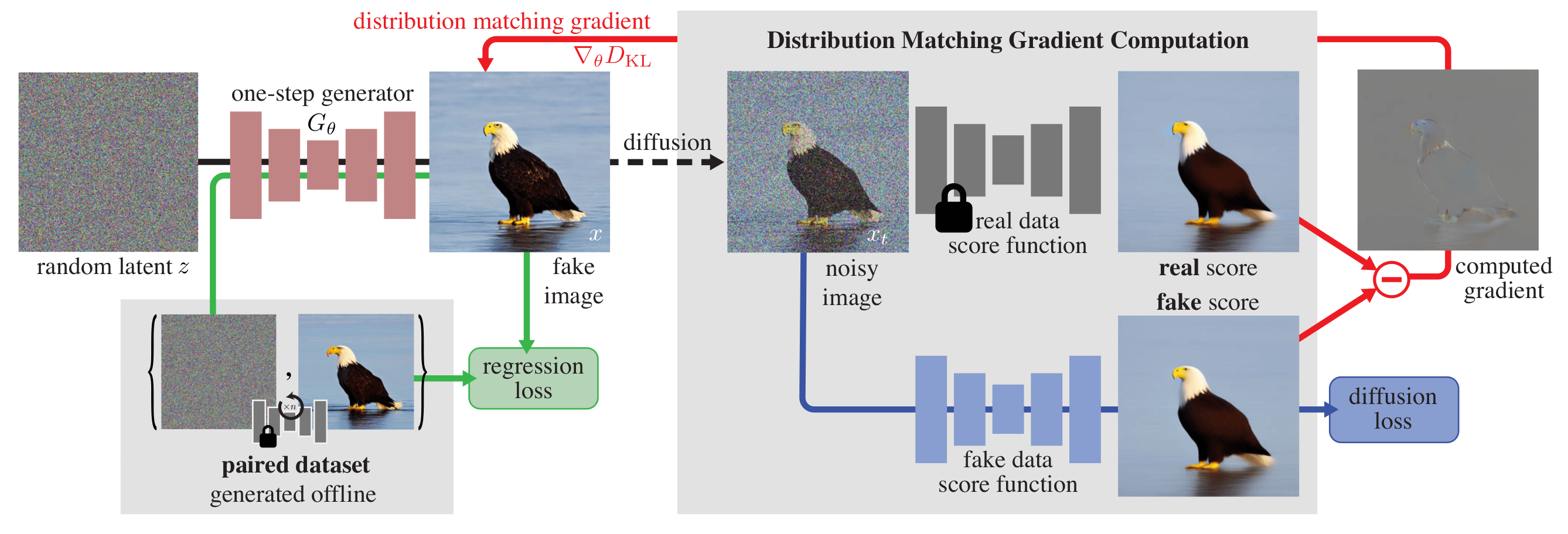
The core idea of DMD distillation is to minimize the KL divergence between the output distributions of the distilled model and the original model:
Since directly computing the probability density is nearly impossible, DMD distillation instead computes the gradient of this KL divergence:
where \(s_\text{real}(x) =\nabla_{x} \text{log}~p_\text{real}(x)\) and \(s_\text{fake}(x) =\nabla_{x} \text{log}~p_\text{fake}(x)\) are score functions. Score functions can be computed by the model. Therefore, DMD distillation maintains three models in total:
real_score, computes the score of the real distribution; since the real distribution is fixed, DMD distillation uses the original model with fixed weights as its score function;fake_score, computes the score of the fake distribution; since the fake distribution is constantly updated, DMD distillation initializes it with the original model and fine-tunes it to learn the output distribution of the generator;generator, the student model, guided by computing the gradient of the KL divergence betweenreal_scoreandfake_score.
Self-Forcing#
DMD distillation technology is designed for image generation. The step distillation in LightX2V is implemented based on Self-Forcing technology. The overall implementation of Self-Forcing is similar to DMD, but following DMD2, it removes the regression loss and uses ODE initialization instead. Additionally, Self-Forcing adds an important optimization for video generation tasks:
Current DMD distillation-based methods struggle to generate videos in one step. Self-Forcing selects one timestep for optimization each time, with the generator computing gradients only at this step. This approach significantly improves Self-Forcing’s training speed and enhances the denoising quality at intermediate timesteps, also improving its effectiveness.
LightX2V#
Self-Forcing performs step distillation and CFG distillation on 1.3B autoregressive models. LightX2V extends it with a series of enhancements:
Larger Models: Supports step distillation training for 14B models;
More Model Types: Supports standard bidirectional models and I2V model step distillation training;
Better Results: LightX2V uses high-quality prompts from approximately 50,000 data entries for training;
For detailed implementation, refer to Self-Forcing-Plus.
🎯 Technical Features#
Inference Acceleration: Reduces inference steps from 40-50 to 4 steps without CFG, achieving approximately 20-24x speedup
Quality Preservation: Maintains original video generation quality through distillation techniques
Strong Compatibility: Supports both T2V and I2V tasks
Flexible Usage: Supports loading complete step distillation models or loading step distillation LoRA on top of native models; compatible with int8/fp8 model quantization
🛠️ Configuration Files#
Basic Configuration Files#
Multiple configuration options are provided in the configs/distill/ directory:
Configuration File |
Purpose |
Model Address |
|---|---|---|
Load T2V 4-step distillation complete model |
||
Load I2V 4-step distillation complete model |
||
Load Wan-T2V model and step distillation LoRA |
||
Load Wan-I2V model and step distillation LoRA |
Key Configuration Parameters#
Since DMD distillation only trains a few fixed timesteps, we recommend using
LCM Schedulerfor inference. In WanStepDistillScheduler,LCM Scheduleris already fixed in use, requiring no user configuration.infer_steps,denoising_step_listandsample_shiftare set to parameters matching those during training, and are generally not recommended for user modification.enable_cfgmust be set tofalse(equivalent to settingsample_guide_scale = 1), otherwise the video may become completely blurred.lora_configssupports merging multiple LoRAs with different strengths. Whenlora_configsis not empty, the originalWan2.1model is loaded by default. Therefore, when usinglora_configand wanting to use step distillation, please set the path and strength of the step distillation LoRA.
{
  "infer_steps": 4,                              // Inference steps
  "denoising_step_list": [1000, 750, 500, 250],  // Denoising timestep list
  "sample_shift": 5,                             // Scheduler timestep shift
  "enable_cfg": false,                           // Disable CFG for speed improvement
  "lora_configs": [                              // LoRA weights path (optional)
    {
      "path": "path/to/distill_lora.safetensors",
      "strength": 1.0
    }
  ]
}
📜 Usage#
Model Preparation#
Complete Model:
Place the downloaded model (distill_model.pt or distill_model.safetensors) in the distill_models/ folder under the Wan model root directory:
For T2V:
Wan2.1-T2V-14B/distill_models/For I2V-480P:
Wan2.1-I2V-14B-480P/distill_models/
LoRA:
Place the downloaded LoRA in any location
Modify the
lora_pathparameter in the configuration file to the LoRA storage path
Inference Scripts#
T2V Complete Model:
bash scripts/wan/run_wan_t2v_distill_4step_cfg.sh
I2V Complete Model:
bash scripts/wan/run_wan_i2v_distill_4step_cfg.sh
Step Distillation LoRA Inference Scripts#
T2V LoRA:
bash scripts/wan/run_wan_t2v_distill_4step_cfg_lora.sh
I2V LoRA:
bash scripts/wan/run_wan_i2v_distill_4step_cfg_lora.sh
🔧 Service Deployment#
Start Distillation Model Service#
Modify the startup command in scripts/server/start_server.sh:
python -m lightx2v.api_server \
  --model_cls wan2.1_distill \
  --task t2v \
  --model_path $model_path \
  --config_json ${lightx2v_path}/configs/distill/wan_t2v_distill_4step_cfg.json \
  --port 8000 \
  --nproc_per_node 1
Run the service startup script:
scripts/server/start_server.sh
For more details, see Service Deployment.